
一个python做的进程占用查找器
---
前言
你有没有过这样的经历:想要删除文件,但是电脑总显示 `在另一个程序中打开`
---
**文件占用管理器** 是一款基于 Python + Tkinter 的图形化工具,用于快速查看哪些进程正在占用指定文件,并允许用户**优雅终止**或**强制结束**这些进程。
它特别适合解决 Windows 用户 `文件正在使用,无法删除/移动/修改` 的常见问题,比系统自带的任务管理器更直观、更聚焦。
代码展示
python
import psutil
import os
import tkinter as tk
from tkinter import ttk, messagebox, filedialog
import threading
import queue
import sys

# 尝试导入拖放支持
try:
    from tkinterdnd2 import DND_FILES, TkinterDnD
    HAS_DND = True
except ImportError:
    HAS_DND = False
    print("提示:安装 tkinterdnd2 可启用拖放功能 (pip install tkinterdnd2)")


class FileLockerApp:
    def __init__(self, root):
        self.root = root
        self.root.title("文件占用管理器")
        self.root.geometry("650x480")

        self.is_scanning = False
        self.scan_queue = queue.Queue()
        self.total_scanned = 0  # 用于调试计数

        self.create_widgets()
        self._set_buttons_state(True)

        if HAS_DND:
            self._setup_drag_drop()

    def _setup_drag_drop(self):
        self.root.drop_target_register(DND_FILES)
        self.root.dnd_bind('<<Drop>>', self.on_drop)
        self.entry_path.drop_target_register(DND_FILES)
        self.entry_path.dnd_bind('<<Drop>>', self.on_drop)
        self.status_var.set("就绪 — 可将文件拖入窗口自动扫描")

    def on_drop(self, event):
        files = event.data
        if files.startswith('{') and files.endswith('}'):
            files = files[1:-1]
        file_list = files.splitlines()
        if len(file_list) == 1 and ' ' in file_list[0] and not os.path.exists(file_list[0]):
            file_list = file_list[0].split()
        file_list = [f.strip() for f in file_list if f.strip()]
        if not file_list:
            return
        first_file = file_list[0].strip('"').strip("'")
        if os.path.exists(first_file):
            self.file_path.set(first_file)
            self.scan_processes()
        else:
            messagebox.showwarning("无效文件", f"无法识别文件路径:\n{first_file}")

    def create_widgets(self):
        frame_file = ttk.LabelFrame(self.root, text="选择文件", padding=10)
        frame_file.pack(fill="x", padx=10, pady=5)

        self.file_path = tk.StringVar()
        self.file_path.trace_add('write', self._on_path_change)

        self.entry_path = ttk.Entry(frame_file, textvariable=self.file_path, width=50)
        self.entry_path.pack(side="left", padx=5)

        btn_browse = ttk.Button(frame_file, text="浏览...", command=self.browse_file)
        btn_browse.pack(side="left")

        frame_process = ttk.LabelFrame(self.root, text="占用进程列表", padding=10)
        frame_process.pack(fill="both", expand=True, padx=10, pady=5)

        tree_frame = ttk.Frame(frame_process)
        tree_frame.pack(fill="both", expand=True)

        self.tree = ttk.Treeview(tree_frame, columns=("pid", "name"), show="headings", height=12)
        self.tree.heading("pid", text="PID")
        self.tree.heading("name", text="进程名称")
        self.tree.column("pid", width=80, anchor="center")
        self.tree.column("name", width=250)

        scrollbar = ttk.Scrollbar(tree_frame, orient="vertical", command=self.tree.yview)
        self.tree.configure(yscrollcommand=scrollbar.set)
        self.tree.pack(side="left", fill="both", expand=True)
        scrollbar.pack(side="right", fill="y")

        frame_actions = ttk.Frame(self.root)
        frame_actions.pack(fill="x", padx=10, pady=5)

        row1 = ttk.Frame(frame_actions)
        row1.pack(fill="x", pady=2)
        self.btn_scan = ttk.Button(row1, text="扫描占用", command=self.scan_processes)
        self.btn_scan.pack(side="left", padx=5)
        self.btn_clear = ttk.Button(row1, text="清空列表", command=self.clear_list)
        self.btn_clear.pack(side="left", padx=5)
        ttk.Separator(row1, orient="vertical").pack(side="left", fill="y", padx=10)

        row2 = ttk.Frame(frame_actions)
        row2.pack(fill="x", pady=2)
        self.btn_kill = ttk.Button(row2, text="结束进程 (优雅)", command=self.kill_processes)
        self.btn_kill.pack(side="left", padx=5)
        self.btn_force = ttk.Button(row2, text="强制结束进程", command=self.force_kill_processes)
        self.btn_force.pack(side="left", padx=5)

        self.status_var = tk.StringVar(value="就绪")
        status_bar = ttk.Label(self.root, textvariable=self.status_var, relief="sunken", anchor="w")
        status_bar.pack(fill="x", padx=10, pady=(5, 10))

    def _on_path_change(self, *args):
        self.clear_list()

    def _set_buttons_state(self, enabled):
        state = "normal" if enabled else "disabled"
        self.btn_scan.config(state=state)
        self.btn_kill.config(state=state)
        self.btn_force.config(state=state)
        self.btn_clear.config(state=state)

    def browse_file(self):
        file = filedialog.askopenfilename()
        if file:
            self.file_path.set(file)
            self.scan_processes()

    def scan_processes(self):
        if self.is_scanning:
            return

        file_path = self.file_path.get().strip()
        if not file_path:
            messagebox.showwarning("警告", "请先选择文件!")
            return

        try:
            abs_path = os.path.realpath(os.path.normpath(file_path))
        except Exception:
            abs_path = file_path

        if not os.path.exists(abs_path):
            messagebox.showerror("错误", f"文件不存在:\n{abs_path}")
            return

        self.clear_list()
        self.status_var.set("正在扫描进程(后台线程),请稍候...")
        self._set_buttons_state(False)
        self.is_scanning = True
        self.total_scanned = 0

        thread = threading.Thread(target=self._scan_thread, args=(abs_path,), daemon=True)
        thread.start()
        self._check_scan_complete()

    def _scan_thread(self, target_path):
        results = []
        found_pids = set()
        use_samefile = True  # 先尝试 samefile
        count = 0
        try:
            procs = psutil.process_iter(attrs=['pid', 'name', 'open_files'])
            for proc in procs:
                count += 1
                # 每 100 个进程更新一次状态(通过队列)
                if count % 100 == 0:
                    self.scan_queue.put(('progress', f"已扫描 {count} 个进程"))

                try:
                    open_files = proc.info.get('open_files')
                    if not open_files:
                        continue
                    for file_obj in open_files:
                        try:
                            if use_samefile:
                                # 使用 samefile 比较
                                match = os.path.samefile(file_obj.path, target_path)
                            else:
                                # 回退到规范化字符串比较(忽略大小写)
                                norm_file = os.path.normpath(os.path.realpath(file_obj.path))
                                norm_target = os.path.normpath(target_path)
                                # Windows 下忽略大小写
                                if sys.platform == 'win32':
                                    match = norm_file.lower() == norm_target.lower()
                                else:
                                    match = norm_file == norm_target

                            if match:
                                pid = proc.info['pid']
                                if pid not in found_pids:
                                    found_pids.add(pid)
                                    results.append((pid, proc.info['name']))
                                break  # 该进程已匹配,无需继续检查其他文件
                        except (OSError, ValueError) as e:
                            # samefile 失败,切换为字符串比较
                            if use_samefile:
                                print(f"[调试] samefile 失败,切换为字符串比较:{e}")
                                use_samefile = False
                            # 字符串比较已在 else 中处理,但这里因为 use_samefile 变为 False,下次循环会走 else
                            # 但当前这一次无法重试,所以直接再比较一次(通过递归调用自身?不,简单起见:再试一次字符串比较)
                            if not use_samefile:
                                # 立即用字符串比较
                                norm_file = os.path.normpath(os.path.realpath(file_obj.path))
                                norm_target = os.path.normpath(target_path)
                                if sys.platform == 'win32':
                                    match = norm_file.lower() == norm_target.lower()
                                else:
                                    match = norm_file == norm_target
                                if match:
                                    pid = proc.info['pid']
                                    if pid not in found_pids:
                                        found_pids.add(pid)
                                        results.append((pid, proc.info['name']))
                                    break
                            continue
                except (psutil.NoSuchProcess, psutil.AccessDenied, psutil.ZombieProcess):
                    continue
                except Exception:
                    continue
        except Exception as e:
            self.scan_queue.put(('error', str(e)))
            return

        # 将总扫描进程数也传递
        self.scan_queue.put(('result', results, count))

    def _check_scan_complete(self):
        try:
            item = self.scan_queue.get_nowait()
            if item[0] == 'result':
                results = item[1]
                total_count = item[2]
                for pid, name in results:
                    self.tree.insert("", "end", values=(pid, name))
                if results:
                    self.status_var.set(f"扫描完成,共找到 {len(results)} 个进程(共扫描 {total_count} 个进程)")
                    first = self.tree.get_children()
                    if first:
                        self.tree.selection_set(first[0])
                        self.tree.focus(first[0])
                else:
                    self.status_var.set(f"未找到占用进程(共扫描 {total_count} 个进程)")
                    messagebox.showinfo("提示",
                        "未扫描到任何进程占用该文件。\n"
                        "可能原因:\n"
                        "1. 文件确实未被任何程序打开。\n"
                        "2. 文件被系统进程占用,需要管理员权限才能查看。\n"
                        "3. 路径比较失败,已尝试 samefile 和字符串比较。\n"
                        "4. 请以管理员身份重新运行此程序。")
                self.is_scanning = False
                self._set_buttons_state(True)
            elif item[0] == 'progress':
                self.status_var.set(item[1])
                # 继续等待
                if self.is_scanning:
                    self.root.after(100, self._check_scan_complete)
                return
            elif item[0] == 'error':
                messagebox.showerror("扫描错误", f"扫描过程中发生异常:\n{item[1]}")
                self.status_var.set("扫描出错")
                self.is_scanning = False
                self._set_buttons_state(True)
        except queue.Empty:
            if self.is_scanning:
                self.root.after(100, self._check_scan_complete)
            return
        except Exception as e:
            self.status_var.set(f"检查线程异常:{e}")
            self.is_scanning = False
            self._set_buttons_state(True)

    def kill_processes(self):
        self._kill_selected(force=False)

    def force_kill_processes(self):
        self._kill_selected(force=True)

    def _kill_selected(self, force):
        selected = self.tree.selection()
        if not selected:
            messagebox.showwarning("警告", "请先选择要结束的进程!")
            return

        action = "强制终止" if force else "终止"
        if not messagebox.askyesno("确认", f"确定要{action}选中的 {len(selected)} 个进程吗?\n该操作不可撤销!"):
            return

        success_count = 0
        for item in selected:
            pid = int(self.tree.item(item, "values")[0])
            try:
                proc = psutil.Process(pid)
                if force:
                    proc.kill()
                else:
                    proc.terminate()
                    gone, alive = psutil.wait_procs([proc], timeout=3)
                    if alive:
                        for p in alive:
                            p.kill()
                self.tree.delete(item)
                success_count += 1
            except psutil.NoSuchProcess:
                self.tree.delete(item)
                success_count += 1
            except Exception as e:
                messagebox.showerror("错误", f"{action}进程 PID={pid} 失败:\n{e}")

        self.status_var.set(f"成功{action} {success_count} 个进程")

    def clear_list(self):
        for item in self.tree.get_children():
            self.tree.delete(item)
        self.status_var.set("列表已清空")


if __name__ == "__main__":
    if HAS_DND:
        root = TkinterDnD.Tk()
    else:
        root = tk.Tk()
    app = FileLockerApp(root)
    root.mainloop()
使用方法
先安装 Python(一定要勾选添加到 PATH 变量选项,若不勾选,请自行添加),
然后打开 `CMD` 或 `PowerShell`
运行:
bash
pip install psutil tkinterdnd2
如果下载卡顿、报错,请尝试换源,详见 [pip 换源](https://www.runoob.com/w3cnote/pip-cn-mirror.html)。
最后,运行程序,会显示一个名为 `文件占用管理器` 的窗口。
# 使用教程
---
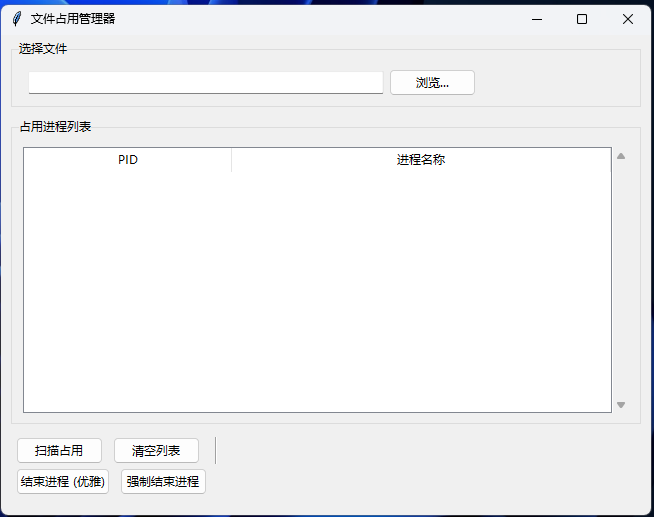
`选择文件`里可以选择文件路径,也可以直接拖动文件到窗口内任意位置以选择要扫描的文件
选择文件后将会自动开始扫描,等待一会后就会给出结果。
扫描时,左下角四个按钮都会变成灰色,无法点击。
若没有开始扫描,可以手动点击 `扫描占用` 按钮。
---
扫描到后,在占用进程列表里选择进程,点击 `结束进程(优雅)` 或 `强制结束进程` 即可。
注:优雅结束是正常结束,如还不行,就使用强制结束。
---
最后
请尽量不要结束系统进程!
请尽量不要结束系统进程!
请尽量不要结束系统进程!
(若自行结束系统进程,后果自负!!!)
鼠王啊烈的个人博客版权声明:以上内容作者已申请原创保护,未经允许不得转载,侵权必究!授权事宜、对本内容有异议或投诉,敬请联系网站管理员,我们将尽快回复您,谢谢合作!